Preparation
-
Users must confirm that their personal computer and equipment meet the software and hardware specifications recommended by VoiceTube Hero, and bear the related costs and expenses themselves.
If the user's personal equipment or environment affects their use of the Voicetube Hero tutoring service, this is unrelated to VoiceTube Hero tutoring. -
To provide users with a better service experience, VoiceTube Hero tutoring may record or log statements, conversations, consultation content, submitted information, and other related matters during, before, or after the service period, and retain such records when VoiceTube deems it necessary.
Users agree that VoiceTube may collect the above data, and VoiceTube may use it within an appropriate scope. -
Users must allow "Camera" and "Microphone" access permissions.
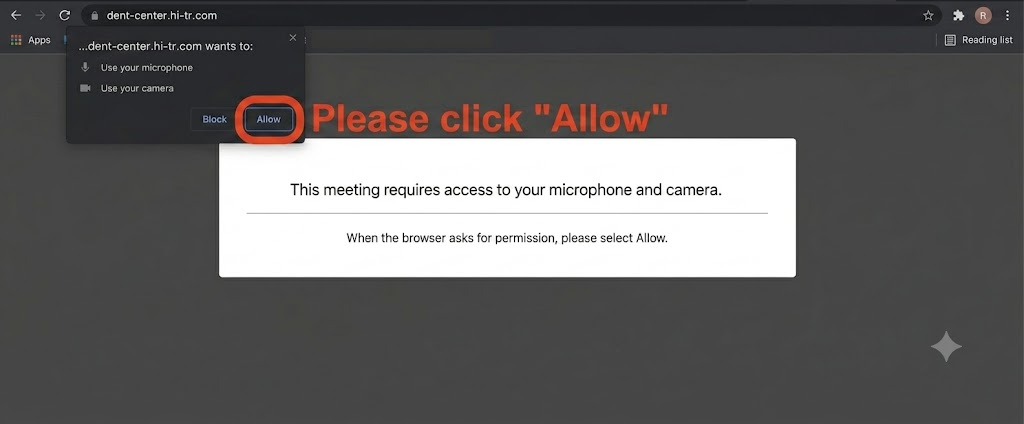
Chrome on computer:
Using the camera and microphone
a. Open Chrome.
b. Go to the website that needs to use the microphone and camera.
c. When the prompt appears on screen, select [Allow] or [Block].-
Allowed websites : When you browse the website, the website can start recording.
If you are using another Chrome tab or application, the website cannot activate the recording function. -
Blocked websites : Some websites will not work after being blocked — for example, you will not be able to join a video meeting.
-
Please refer to: Google Using the camera and microphone
VoiceTube Hero Tutoring Class Guidelines
-
Class times:
1.1 Classes begin between 6:00 - 23:00, Monday to Sunday.
(Tutoring system customer service hours: 08:00-23:00 → it is recommended to take classes within the tutoring system customer service hours.)
1.2 Each class is 25 minutes, starting on the hour or half-hour -
Booking classes: (currently booking can only be done on the computer web platform)
2.1 You can book classes online 24 hours a day
2.2 You must book at least 15 minutes before class. (The earlier you book, the better.)
2.3 Every day at 00:00 (24:00), classes for 35 days ahead are simultaneously opened for booking.
2.4 After a successful booking, you will receive an email, and you can add the class time from the email to your Google Calendar to manage your schedule. -
Cancelling a class or changing the time:
Cancellation rules:
The number of classes that can be cancelled is 1/3 of the tutoring course. For example: for a 48-class tutoring course, there are 16 cancellable classes.
After a successful booking:
Cancelling 3 hours or more in advance will deduct 1 cancellation credit;
Cancelling within 3 hours will deduct 1 class.
Changing the class time:
Please first cancel the original booked class and rebook a new time slot.
Each cancellation will count toward the cancellation count or the number of classes. -
Teacher cancels a class:
4.1 If the booked teacher is temporarily unable to teach, an email notification will be sent, and you will need to rebook a class.
4.2 For a last-minute booking, if the teacher does not accept the class, that class will be cancelled, will not be deducted, and an email notification will be sent. -
Pre-class reminder assistant:
For class times between 11:00 and 23:25, you will receive an email notification 4 hours before class.
(Tutoring system customer service hours: 08:00-23:00 → it is recommended to take classes within the tutoring system customer service hours.)
Note: Please be sure to keep track of your class times yourself; not receiving a notification will not be accepted as a reason for a make-up class. -
Class statuses are as follows:
Booking in progress
Booked
Completed
No-show
Cancelled
Booking failed
Teacher cancelled
Cancelled for cause -
Course materials download:
After a tutoring class, you can download the class record file within three days, and download the course material file with the teacher's notes;
If the class was recorded, you can also download the class recording file within three days.
(After three days, downloading is no longer possible, and we are unable to provide the video.)
Service System Changes
If VoiceTube's service is altered, changed, suspended, or interrupted, VoiceTube will, to the extent practicable, notify students by email, announcement, or other appropriate means before the event occurs.
VoiceTube shall not be liable for any direct or indirect damages suffered by students as a result of the aforementioned alteration, change, suspension, or interruption.
When the following circumstances apply, VoiceTube may announce on its official website the interruption or termination of this service.
For service suspensions caused by special holidays, VoiceTube may not provide make-up classes, and in the event of force majeure, may interrupt the service without prior notice.
-
Failures of telecommunications companies, domestic or international political situations, natural disasters, malfunction and maintenance of the servers providing the service, or other force majeure causes that make it difficult to provide the service.
-
When the teacher is unable to provide teaching services due to national holidays in the teacher's country (such as Holy Week, Easter, Christmas, etc. in the Philippines).
If a service interruption or termination occurs that is not attributable to VoiceTube and a student or third party suffers any damage, VoiceTube shall not bear related liability for such damage.
Notifications
Please ensure that the email address provided when registering as a user is correct and able to be contacted and receive emails.
VoiceTube's main method of sending notifications is email as the primary notification channel; this is not a notification channel VoiceTube is obligated to provide, so please rely on the emails sent by VoiceTube.
If a VoiceTube notification email or announcement cannot be received due to personal factors — such as the user not checking it, not providing correct contact information, or not notifying VoiceTube after changing their information — the message shall be deemed delivered by VoiceTube 7 days after it is sent, and students may not raise objections or request compensation from VoiceTube on this basis.
Other
If you need to apply for a proof of attendance, please email customer service (hero@voicetube.com) after the course usage period ends. If the course usage period has not yet ended, we are unable to provide a proof of attendance.
If you need an invoice, please select company invoice when purchasing the course, and enter your company's full name, unified business number, Chinese name, and company address.
The invoice will be sent by email to the purchaser's inbox.
📝 Note: This article was machine-translated. If anything is unclear, please contact our support team.